BananaGroup now runs its Medicare Supplement sales on its own app: prospects, quotes, enrollment alerts and the sales pipeline in one place, built on Oracle in a couple of days.
I’ve spent my career as an Oracle DBA. I can tune a database in my sleep, but I’m not a Python developer. So I did what a DBA does: put the business rules in the database, kept the web layer thin, and had Claude, an AI assistant, write most of the Python while I drove the design. This post walks through what the app does, how it’s built, and what I learned along the way.
The problem: timing and price are everything
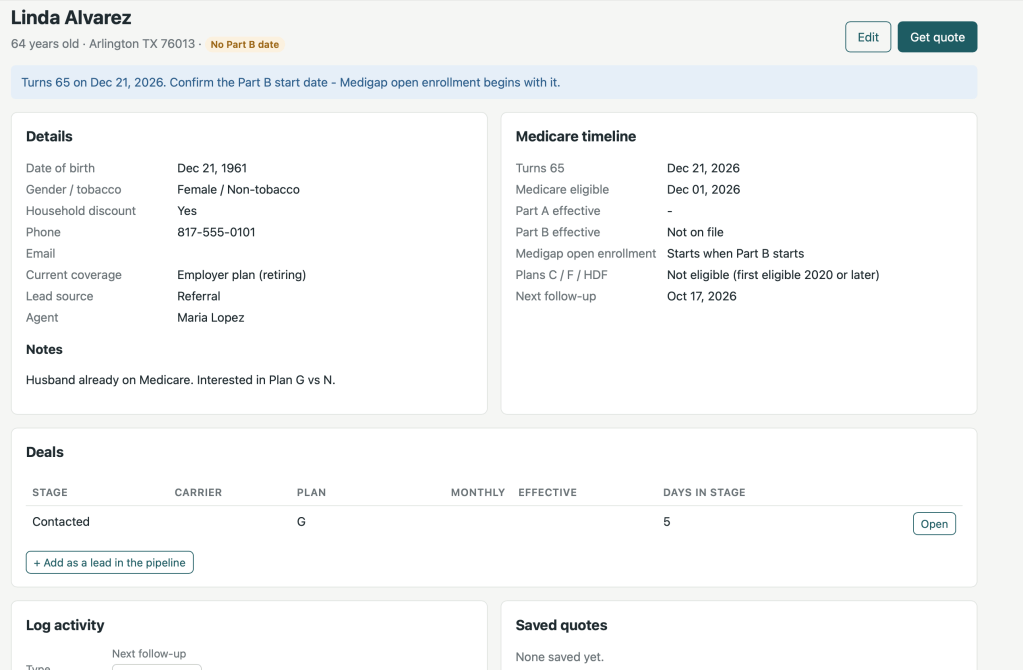
Selling Medigap is a timing business. A person gets a six-month Medigap open enrollment window that starts the month they are both 65 and enrolled in Part B. Inside that window carriers can’t ask health questions. Miss it, and the client may be underwritten or turned down.
Price is the other half. Plans A through N are standardized, so a Plan G from one carrier covers exactly what a Plan G from another does. What differs is the premium, and that depends on age, gender, tobacco use, ZIP code, household discounts, and whether the carrier rates by attained age, issue age or community rating.
Spreadsheets and sticky notes don’t keep up with that. I wanted one place that answers three questions every morning:
- Who is about to turn 65, or is inside their enrollment window right now?
- What does each plan actually cost this person, from every carrier we sell?
- Where is every deal in the pipeline, and which ones have stalled?
A tour of the app
The app has seven screens. Agents see their own book of business; managers see everyone’s and get two extra screens for running the agency.
| Screen | What it does | Who sees it |
|---|---|---|
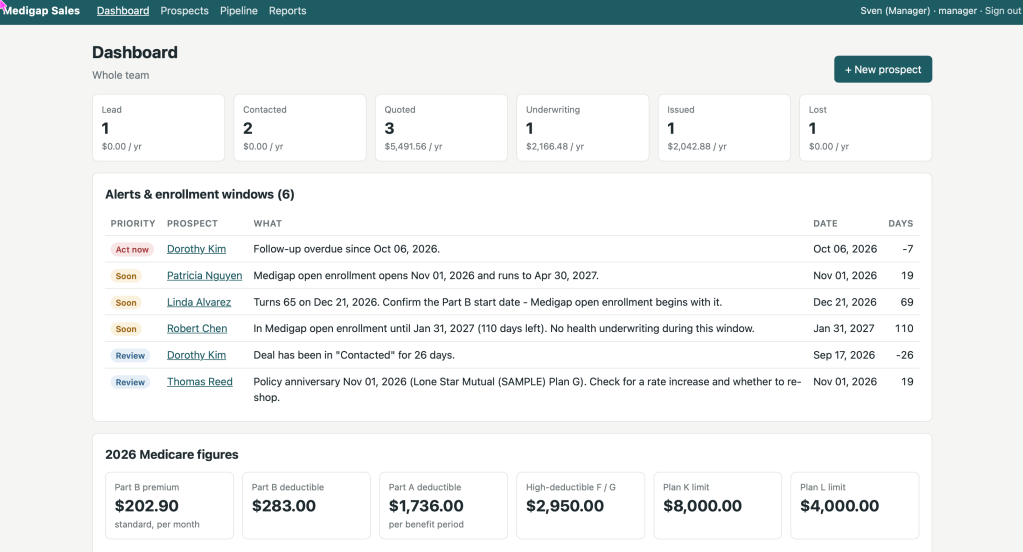
| Dashboard | Deals and annual premium by pipeline stage, a ranked list of alerts, and the year’s Medicare figures | Everyone |
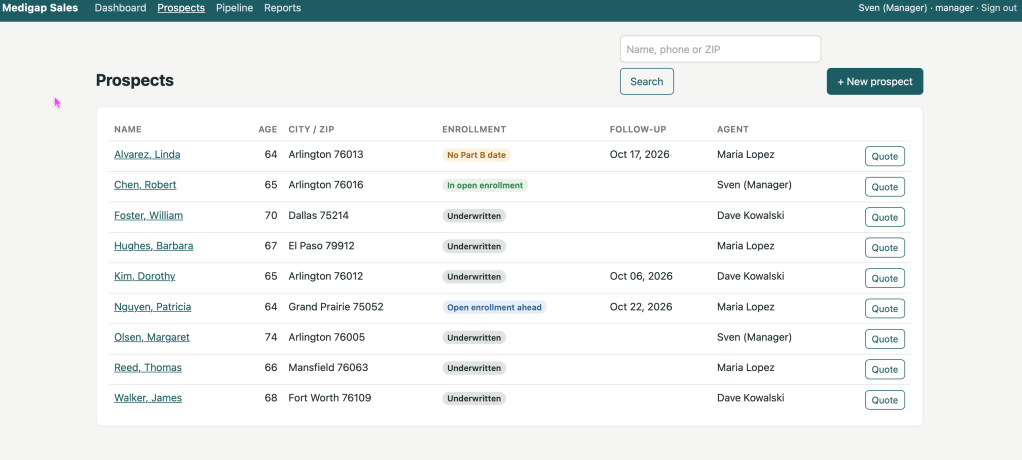
| Prospects | Contact details, Medicare dates, rating facts, notes, activity log and follow-up dates | Everyone |
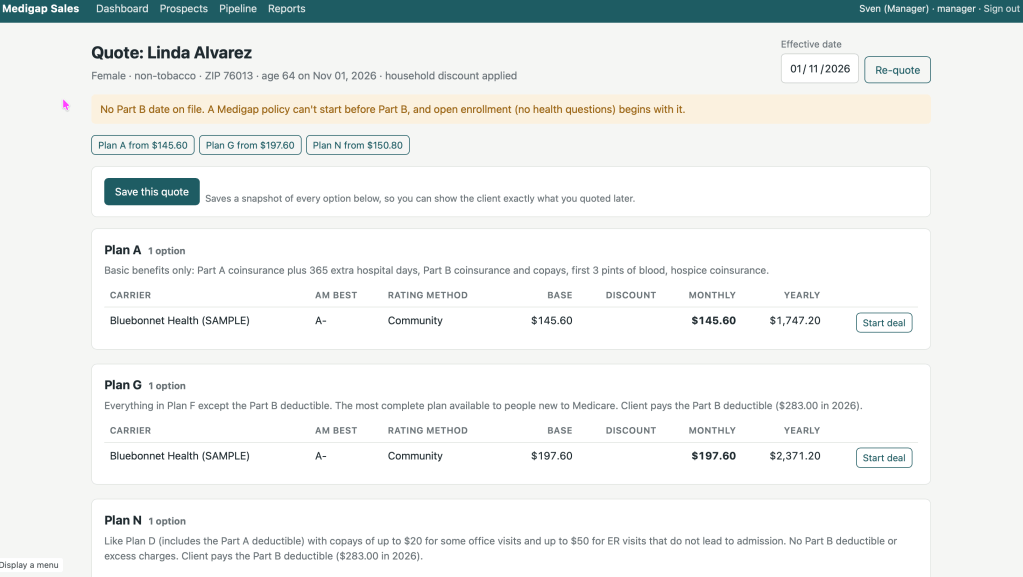
| Quote | Every plan the prospect can buy on a chosen start date, from every carrier, cheapest first | Everyone |
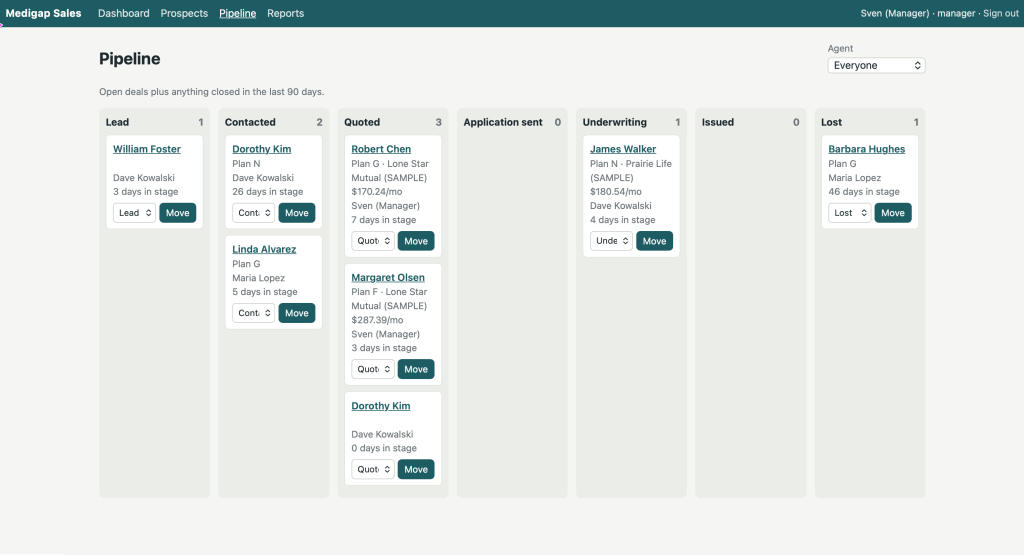
| Pipeline | A board from Lead to Issued or Lost, with every stage change logged | Everyone |
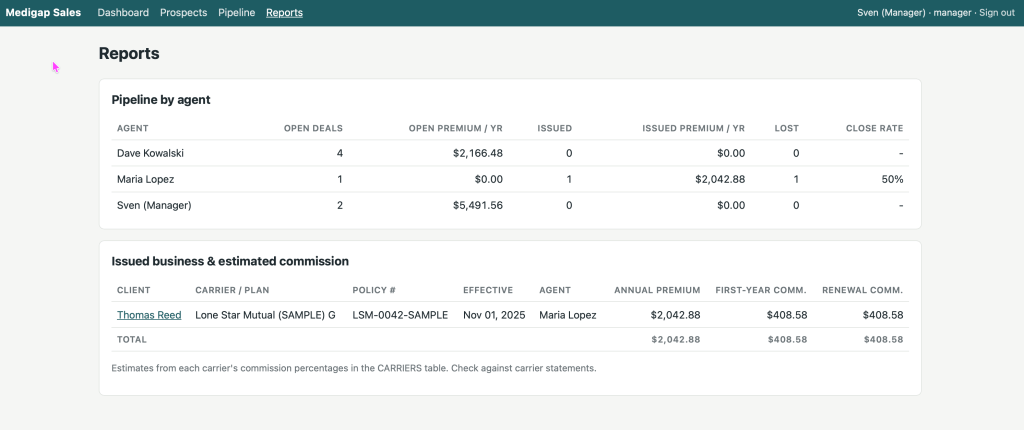
| Reports | Pipeline by agent, close rate, issued premium and estimated commissions | Everyone |
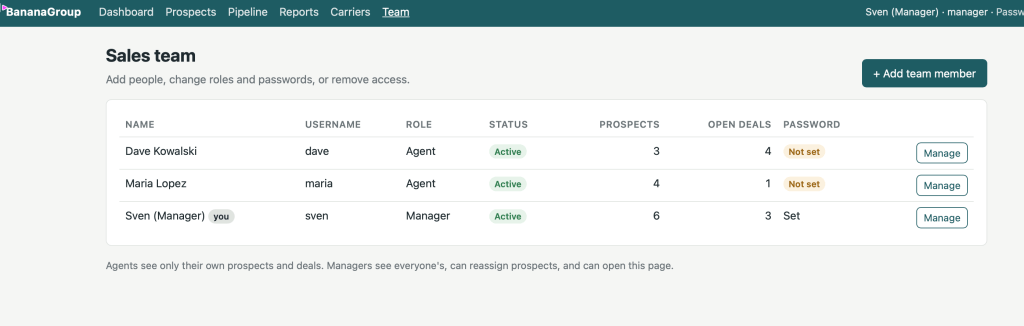
| Team | Add people, change roles and passwords, reassign a departing agent’s prospects | Managers |
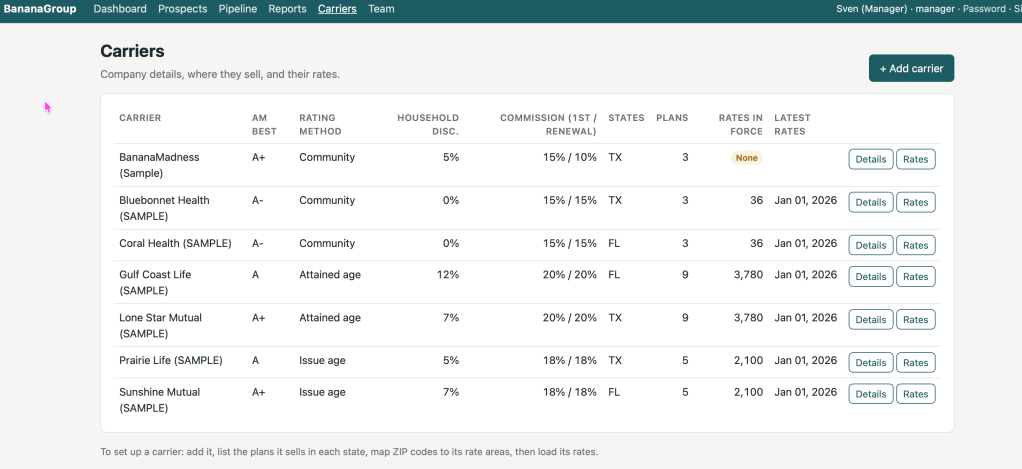
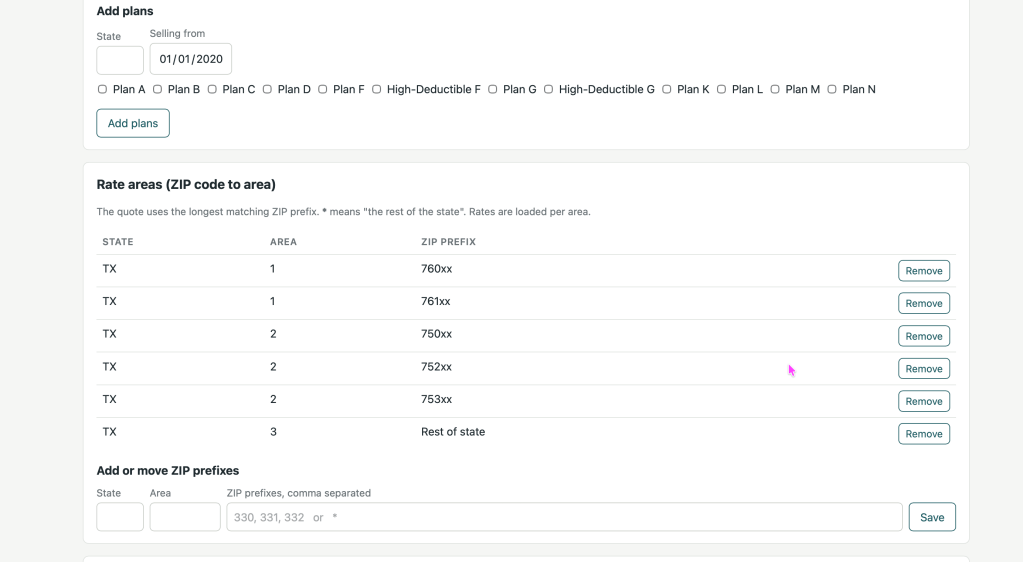
| Carriers | Company details, plans by state, ZIP rate areas, and rates: edit, upload, download, apply an increase | Managers |
The alerts are the heart of it. The dashboard flags who is turning 65 soon, whose open enrollment opens or closes in the coming weeks, which follow-ups are overdue, which policies hit their anniversary (time to check for a rate increase) and which deals have sat in one stage for more than two weeks.
The quote screen does the arithmetic I used to do by hand. It works out the prospect’s age on the start date, finds their carrier rate area from the ZIP code, applies the household discount and lists the result by plan. It also knows the rule that only people first eligible for Medicare before 2020 can buy Plans C and F, and it says plainly whether the start date falls inside the no-health-questions window. A saved quote is a snapshot, so a client can see exactly what they were shown even after rates change.
Rates stay current without touching SQL. On the Carriers screen a manager can upload a carrier’s rate sheet as a CSV. Every row is checked first, and if any row is wrong nothing loads. When a carrier announces an 8.5% increase from January, one form creates the new rate set while quotes for earlier dates keep the old prices.
Under the hood: let Oracle do the thinking
The design choice that made this work: every business rule lives in Oracle, and the Python only shows pages.
The browser talks to a small Flask app, and only one Python file ever talks to the database.
One PL/SQL package holds the rules. MEDSUPP_PKG works out a person’s age on any date, their Medicare eligibility date, their open enrollment window, and whether they can still buy Plans C and F. It maps a ZIP code to each carrier’s rate area by longest matching prefix. Quoting is a pipelined table function, so the app and I run exactly the same query:
Views do the reporting. The alerts on the dashboard are one view, V_ENROLLMENT_ALERTS, with a UNION ALL branch per kind of alert. A new alert means a new branch, not new Python.
Rates are effective-dated. Every rate row carries a start date and an optional end date. A rate increase ends the old set the day before the new one starts, so a quote for December still uses December’s prices and old quotes stay honest.
The Python stays boring on purpose. Flask renders the pages, and db.py wraps python-oracledb in thin mode, so no Oracle Instant Client is needed. Passwords are hashed, every form carries a CSRF token, and agents can only open their own records.
What I learned
Settings belong in one file, not in the code. My first runs failed with errors like KeyError: 'SECRET_KEY'. The app reads its database login and secret key from a .env file, and I hadn’t created one. Then I typed my connect string straight into the Python, where it was taken as a setting name. The rule I follow now: the code never changes for my setup; .envdoes.
Accurate prices come from real rate sheets. The app ships with fictional carriers so every screen has data, including a Florida set modeled on published 2026 averages, where Plan G runs about $283 a month at 65. Those numbers are realistic in size but invented. Before quoting a real client, each carrier’s filed rates have to be loaded, and the yearly CMS figures updated each November. For 2026 those are a $202.90 Part B premium, a $283 Part B deductible and a $2,950 high-deductible G limit.
Client data needs real care. The app holds names, birth dates and health notes. It runs on the home network only, deliberately stores no Medicare or Social Security numbers, and keeps history instead of deleting it: a departing agent is deactivated, not erased, and their prospects are handed to someone else.
What’s next
Next up is loading real carrier rates and retiring the sample data. After that, the list I’d like to tackle:
- Guaranteed-issue rights outside open enrollment, such as losing employer coverage or leaving a Medicare Advantage plan during a trial period
- State-specific switching rules, for agents who sell outside Texas
- Each carrier’s underwriting questions, so an agent knows before applying whether a client is likely to qualify
The bigger lesson is about who gets to build software. If you know your data and your rules, you can build the tool your business needs, even if Python isn’t your first language. Put the logic where you’re strongest, keep everything else thin, and let an assistant handle the parts you’d rather not write.


Leave a Reply