
I’ve uploaded the python code to Github here:
https://github.com/spbutterworth/adsb-tracker
Note that I have left internal IP addresses (my ADSB Raspberry Pi), ports and database user passwords (oracle – really quite secret!) intact within the code. Everything below here is a refreshed version of my previous posts.
Significant changes since the last time….
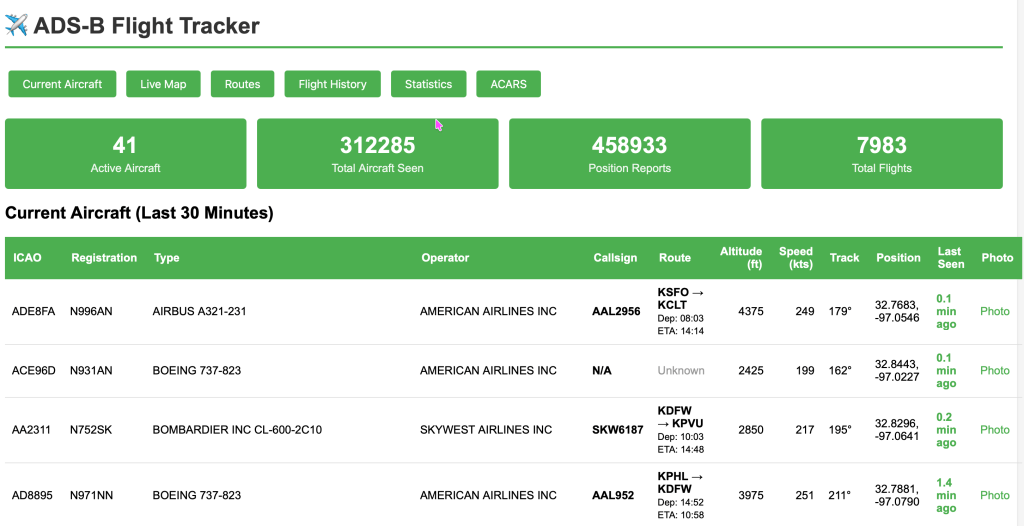
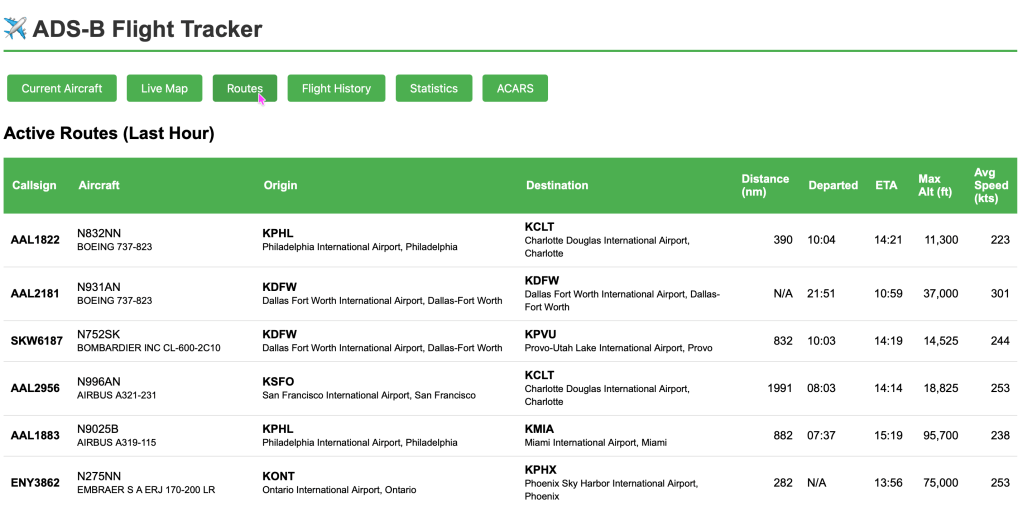
Routes. I’ve made a call to adsbdb.com’s API to use the call sign to determine the route information that previously wasn’t getting picked up.
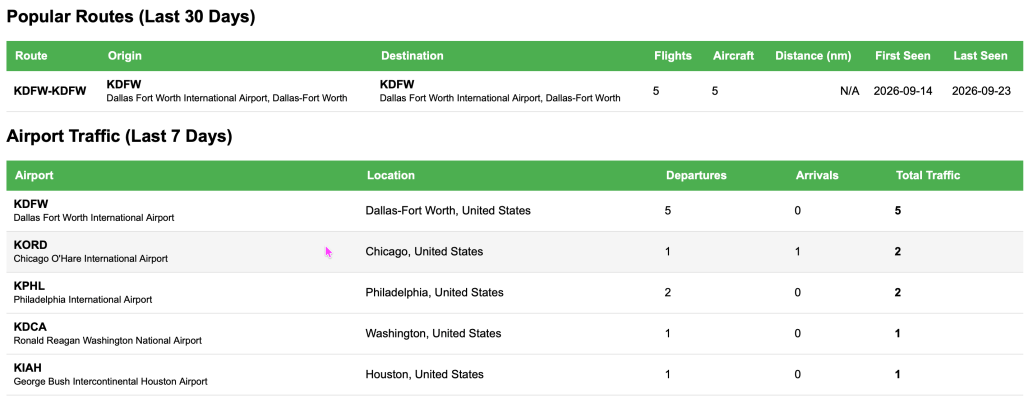
Next, with the route data, we can also now see the popular routes and airport (origin/destination) information.
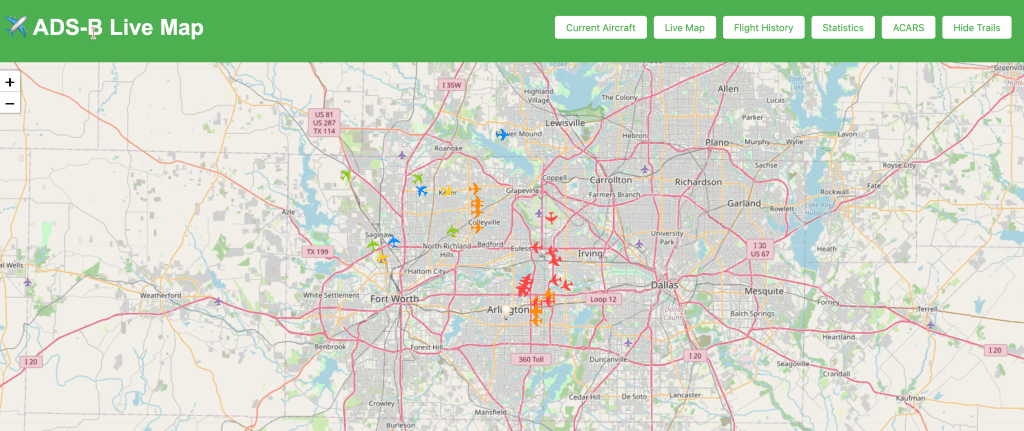
Finally, I fixed the issue of too many planes showing up on the live map with a fixed timestamp window setting.
Other changes – I ended up moving the database from a container (docker) on my Mac mini to a VirtualBox Linux 9 VM running on a beefy Windows 11 machine (128GB memory and a few TB of M2 SSD storage. This allows me to use the latest 26ai release for Linux and that removes the size limitation that comes with the 23ai free edition (12GB – once you hit that limit, your only way forward is to delete data!).
I’ve not kept my ACARS receiver online for a bit – every now and again I will fire it up, but to be sure, there’s a lot of obscure data extracted from the non-encrypted data stream. If you want to read more about it, look at my previous post: https://cynicalgsd.com/2026/03/10/adding-acars-to-my-ads-b-flight-tracker-a-deep-dive-into-aircraft-data-integration/
Overview
The system has four parts: a Raspberry Pi receiver, a Python collector, an Oracle database and a Flask web app. Install them in that order. The collector reads the Pi’s BaseStation feed on port 30003, writes aircraft, flights and positions to Oracle, and looks up each flight’s route on adsbdb.com. The web app reads Oracle and serves the pages on port 5001.
system architecture · 6 components
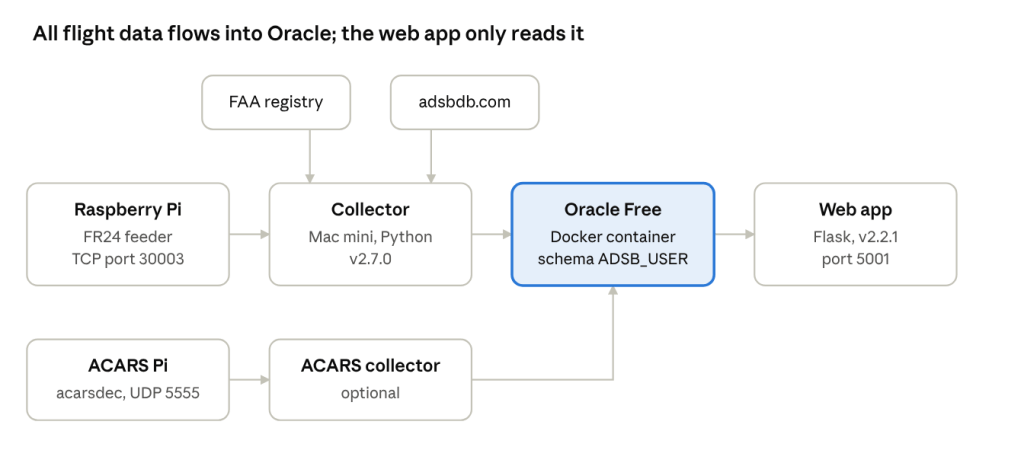
The collector pulls aircraft details from the FAA registry once a day and each flight’s route from adsbdb; the optional ACARS path writes to the same database.
This guide covers the current code versions: collector v2.7.0 and web app v2.2.1. A second Pi running acarsdec feeds the ACARS page; its own setup is outside this guide, but the web app needs its acars_routes.py module to start.
Prerequisites
You need a working FR24 feeder Pi, a Mac (or Linux box) for the collector and web app, and Docker for Oracle. All three must reach each other on the home network.
| Item | What’s needed | Current setup |
| ADS-B receiver | Raspberry Pi with RTL-SDR dongle and FR24 feeder; BaseStation output on TCP 30003 | 192.168.10.139:30003 |
| Collector and web app host | macOS or Linux, always on, Python 3.10 or later | Mac mini |
| Database host | Docker (Docker Desktop on Mac), 4 GB RAM and 20 GB disk for Oracle | 192.168.10.51:1521, service PDB1 |
| Internet access | From the collector host to registry.faa.gov (daily FAA download) and api.adsbdb.com (route lookups) | Home broadband |
| ACARS (optional) | Second Pi running acarsdec, JSON over UDP 5555 | pi24-bookworm |
| Ports | 30003 (Pi to collector), 1521 (Oracle), 5001 (web app) |
Check the feed before going further: nc 192.168.10.139 30003 should print lines starting with MSG,. Press Ctrl+C to stop.
Oracle database
Oracle Free runs in a Docker container; the application lives in one schema, ADSB_USER, in the pluggable database. Steps 1 to 3 are one-time; steps 4 to 7 build the schema.
- Start the container. Pick your own SYS password; -v keeps the data when the container is recreated.
docker run -d –name oracle-free \
-p 1521:1521 \
-e ORACLE_PWD=<sys_password> \
-v oracle-free-data:/opt/oracle/oradata \
–restart unless-stopped \
container-registry.oracle.com/database/free:latest
The first start takes several minutes. Wait until docker logs -f oracle-free shows DATABASE IS READY TO USE!. The default PDB is FREEPDB1; your current install uses service PDB1, so match the DSN to whatever yours is called.
- Create the application user, connected as SYS to the PDB:
ALTER SESSION SET CONTAINER = FREEPDB1;
CREATE USER adsb_user IDENTIFIED BY <app_password>
DEFAULT TABLESPACE users QUOTA UNLIMITED ON users;
GRANT CREATE SESSION, CREATE TABLE, CREATE VIEW, CREATE PROCEDURE,
CREATE SEQUENCE, CREATE TRIGGER, CREATE JOB TO adsb_user;
- Test the login from the collector host: sqlplus adsb_user/<app_password>@//192.168.10.51:1521/FREEPDB1 (or SQL Developer).
- Create the tables, indexes, constraints and trigger as ADSB_USER with fr24 App Schema 2026-01-21.sql. It creates AIRCRAFT, AIRLINES, AIRPORTS, FLIGHTS, POSITIONS, FLIGHT_ROUTES, ALERTS, ALERT_HISTORY, SQUAWK_CODES, DAILY_STATS and COVERAGE_STATS.
- Add the objects the code calls that the schema export doesn’t contain:
- FLIGHTS.IS_ACTIVE NUMBER(1) DEFAULT 1 — the collector inserts and filters on it.
- Procedure END_STALE_FLIGHTS — the collector calls it every 10 minutes to set is_active = 0 on flights silent for 60 minutes.
- Views V_CURRENT_AIRCRAFT and V_FLIGHT_ROUTES — from fix_empty_views.sql.
- Views V_POPULAR_ROUTES_ENHANCED and V_AIRPORT_TRAFFIC — from fix_route_views.sql (2026-10-10 version).
- The ACARS tables created by the ACARS setup scripts.
- Load reference data: populate_airports.py loads about 7,000 airports and the airline callsign prefixes (run once, about 3 minutes). Airports missing later are added by the collector from adsbdb.
- Optional but recommended: the daily-partitioned POSITIONS table with 14-day retention, so the table doesn’t grow without limit.
All times in the database are America/Chicago local time. Both programs set the session time zone on connect, so queries should use CURRENT_DATE, not SYSDATE (the container’s clock is UTC).
Python and virtual environment
Both programs run from one virtual environment with two packages, oracledb and flask. Everything else they use comes with Python. oracledb runs in thin mode, so no Oracle Instant Client is needed.
- Install Python 3.10 or later. On a Mac: brew install python@3.12. Check with python3 –version.
- Make a project folder outside iCloud Drive (iCloud file watchers caused the earlier “too many open files” errors):
- Create and activate the virtual environment:
python3 -m venv venv
source venv/bin/activate
The prompt now starts with (venv). Run source venv/bin/activate again in every new terminal before starting either program.
- Create requirements.txt in ~/adsb with these two lines, then install:
pip install –upgrade pip
pip install -r requirements.txt
- Check the database driver can log in:
python -c “import oracledb; c = oracledb.connect(user=’adsb_user’, password='<app_password>’, dsn=’192.168.10.51:1521/PDB1′); print(c.version)”
It prints the database version, for example 23.x.
Required code
Five Python files and three SQL scripts are required (the third, fix_empty_views.sql, creates the two current-aircraft views); put them all in ~/adsb, because the collector and web app import their helper modules from the same folder. Older copies in the project (adsb_collector.py, adsb_webapp.py, adsb_collector_restart.py, *_enhanced.py) are superseded — don’t run them.
| File | Version | Needed? | What it does | How it runs |
| adsb_collector_latest.py | 2.7.0 | Required | Reads the Pi feed, stores aircraft, flights and positions, looks up routes on adsbdb, raises alerts | Runs all the time |
| route_detector.py | 1.0.0 | Required | Fallback route guess from positions; imported by the collector | Imported, not run |
| adsb_webapp_221.py | 2.2.1 | Required | Flask web app on port 5001 (rename to adsb_webapp.py if you prefer) | Runs all the time |
| acars_routes.py | current | Required | ACARS page; imported by the web app, which won’t start without it | Imported, not run |
| populate_airports.py | 1.0.0 | Required once | Loads airports and airline prefixes into Oracle | Run once at install |
| fr24 App Schema 2026-01-21.sql | 2026-01-21 | Required once | Tables, indexes, constraints, trigger | Run once as ADSB_USER |
| fix_route_views.sql | 1.0.0 | Required once | Popular-routes and airport-traffic views | Run once as ADSB_USER |
| run_collector.sh | — | Recommended | Restarts the collector if it crashes and keeps logs | Starts the collector |
| update_daily_stats_minimal.py | — | Optional | Fills DAILY_STATS | Once a day |
| ACARS collector and acarsdec | — | Optional | Feeds the ACARS tables from the second Pi | Runs all the time |
The collector also downloads the FAA aircraft registry by itself into ~/.adsb_tracker/faa_cache and refreshes it every 24 hours; there’s nothing to install for it.
Configuration
Each program keeps its settings as constants near the top of the file. Edit them before the first run; the database settings must match in all three files.
| File | Setting | Set it to |
| Collector | ADSB_HOST, ADSB_PORT | Your Pi’s address and 30003 |
| Collector | DB_USER, DB_PASSWORD,DB_DSN | adsb_user, its password, host:1521/service |
| Collector | PI_REBOOT_HOUR_UTC | Hour of the Pi’s daily reboot, in UTC (currently 21) |
| Collector | THROTTLE_*, ADSBDB_* | Leave as shipped unless tuning |
| Web app | DB_USER, DB_PASSWORD,DB_DSN | Same as the collector |
| Web app | RECEIVER_LAT,RECEIVER_LON | Your antenna’s position (map centre) |
| Web app | MAP_WINDOW_MINUTES | How long an aircraft stays on the live map (30) |
| populate_airports.py | Database settings | Same as the collector |
| run_collector.sh | COLLECTOR= line and python3 | $SCRIPT_DIR/adsb_collector_latest.pyand $SCRIPT_DIR/venv/bin/python |
The password is stored in plain text in each file. On a home network that’s acceptable; keep the folder out of shared or synced locations.
Running
Start the collector first, then the web app, each in its own terminal with the virtual environment active.
- Collector, through the restart wrapper (logs go to ~/adsb/logs, last 10 kept):
cd ~/adsb && source venv/bin/activate
chmod +x run_collector.sh
caffeinate -i ./run_collector.sh
caffeinate -i stops the Mac from sleeping while it runs. The first start downloads the FAA registry (about 60 MB), so allow a few minutes before data appears.
- Web app:
cd ~/adsb && source venv/bin/activate
python adsb_webapp_221.py
Open http://<mac-address>:5001 from any device on the network.
- To stop either one, press Ctrl+C in its terminal. The collector commits its pending work before it exits.
The collector restarts itself after 50,000 messages and after “too many open files” errors; the wrapper only matters when it crashes outright. The web app runs Flask’s development server with debug on, which is fine at home but shouldn’t be exposed to the internet.
Verification and troubleshooting
The install is working when all of these are true within 15 minutes of starting.
- ☐ Collector console shows Connected to Oracle Database and Connected to ADS-B feed
- ☐ A Committed. line appears every 10 seconds with a rising message count
- ☐ Route (adsbdb) for … lines appear for airline callsigns
- ☐ SELECT COUNT(*) FROM positions WHERE received_time > CURRENT_DATE – 5/1440; returns more than 0
- ☐ The web app’s Current Aircraft page and Live Map show aircraft
- ☐ The Routes page shows active routes; Airport Traffic fills within an hour, Popular Routes within a day
| Symptom | Likely cause | Fix |
| Connection refused by 192.168.10.139:30003 | Pi rebooting or feeder stopped | Collector retries by itself; check the Pi if it lasts over 5 minutes |
| DPY-6005 / ORA-12514 on connect | Wrong DSN or the container isn’t running | docker ps; check the service name with lsnrctl status in the container |
| ORA-00942: table or view does not exist | A schema step was skipped | Rerun Oracle steps 4 and 5 |
| PLS-00201: END_STALE_FLIGHTS | Procedure missing | Create it (Oracle step 5) |
| Web app won’t start: No module named acars_routes | acars_routes.py not in the folder | Copy it into ~/adsb |
| No module named oracledb or flask | Virtual environment not active | source venv/bin/activate |
| Times on pages are 5 or 6 hours off | A query uses SYSDATE | Use CURRENT_DATE |
| Too many open files (errno 24) | Folder inside iCloud Drive | Move ~/adsb out of iCloud |
| No routes, adsbdb unreachable | No internet from the Mac, or adsbdb down | Lookups pause and resume by themselves; the position-based detector fills in meanwhile |


Leave a Reply