Introduction
I recently built a local web application that captures aircraft data from my Flightradar24 ADS-B receiver and stores it in an Oracle database. As someone who works with Oracle databases professionally but admittedly struggles with Python coding, this project was both challenging and rewarding. In this post, I’ll walk you through the entire journey – from the initial concept to the working application, including all the Oracle errors I encountered and fixed along the way. I will also add that this whole process took less than an hour!
**Author’s note. I also asked Claude to write this blog post, so the majority of the content was created by Claude. You’ll probably note some inconsistencies, but they are minor. For example, the Oracle listener is running on port 1522, not 1521, but you get the picture…
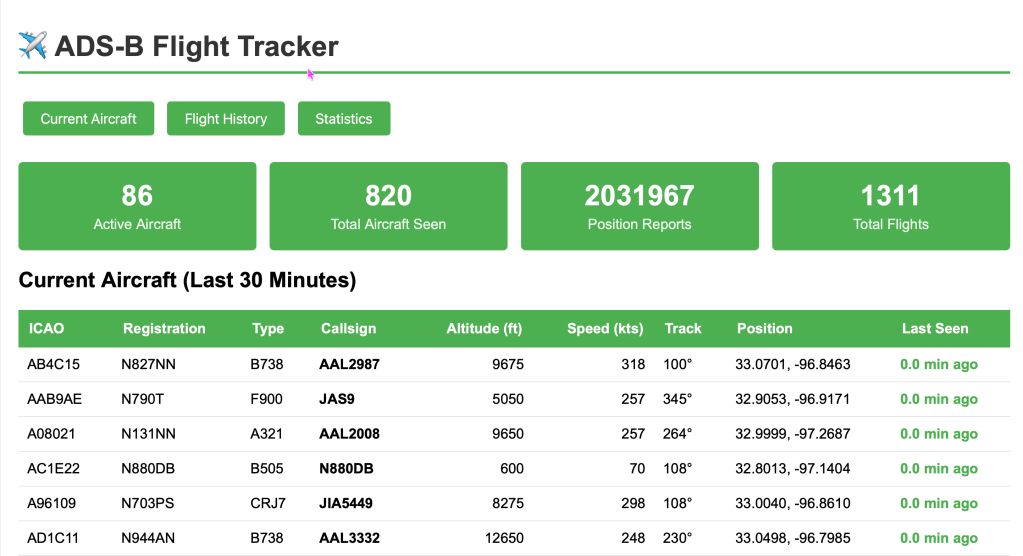
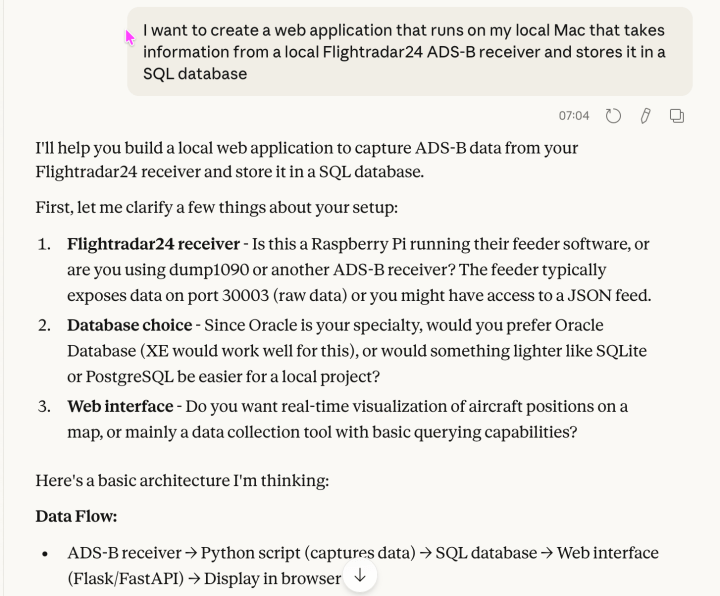
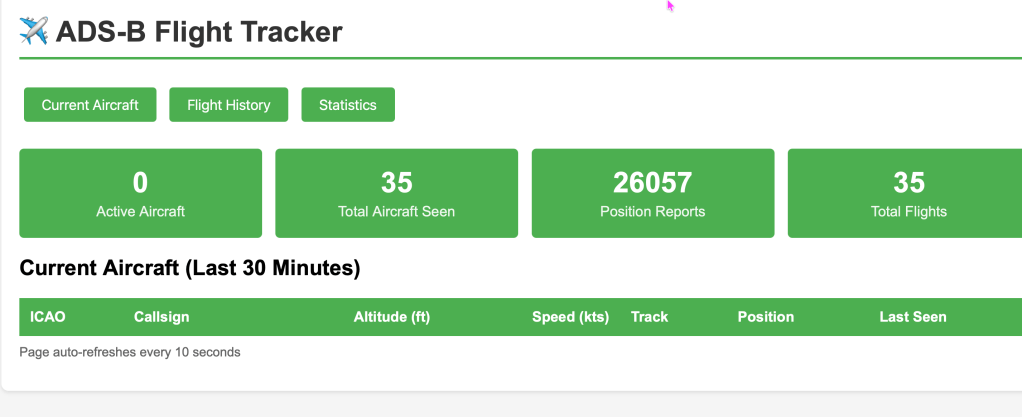
Update: I noticed a number of things that were missing or incorrect.. Active flights weren’t showing up because of a timezone window vs “active time window” discrepancy, call sign data wasn’t there all the time, and I added aircraft type to the page. Looks a lot better now. Still under 2 hours to get to this point.
The Initial Concept
I have a Raspberry Pi running Flightradar24’s ADS-B receiver on my local network (192.168.10.139). This receiver picks up ADS-B transponder signals from aircraft flying overhead and feeds that data to Flightradar24. The receiver exposes the data on port 30003 in BaseStation format – a simple text-based protocol that streams aircraft position reports in real-time.
My goal was simple: capture this data, store it in an Oracle database, and build a web interface to view current aircraft and historical flight data.
Technology Stack
- Database: Oracle 23ai Free running in Docker (container name: ora23c)
- Backend: Python 3 with the oracledb library
- Web Framework: Flask
- ADS-B Data Source: Flightradar24 receiver on Raspberry Pi (port 30003)
Phase 1: Database Design
Being an Oracle database person, I would have started with the schema design, however I wanted to see how far Claude would be able to generate this by itself. As such, I had no real input into the design, so when in this post you see me indicate “I needed to ….’, it’s really Claude that did it. I just watched and gave feedback on what didn’t work. I also ran SQL Developer to run the database user and schema creation scripts:
- AIRCRAFT – Store unique aircraft by ICAO address
- FLIGHTS – Track flight sessions
- POSITIONS – Store position reports (latitude, longitude, altitude, speed)
Here’s the complete schema:
-- ADS-B Flight Tracker Database Schema for Oracle XE-- Run this as your application user-- Table to store unique aircraftCREATE TABLE aircraft ( icao_address VARCHAR2(6) PRIMARY KEY, registration VARCHAR2(10), aircraft_type VARCHAR2(50), first_seen TIMESTAMP DEFAULT CURRENT_TIMESTAMP, last_seen TIMESTAMP DEFAULT CURRENT_TIMESTAMP);-- Table to store individual flights (track by callsign/session)CREATE TABLE flights ( flight_id NUMBER GENERATED ALWAYS AS IDENTITY PRIMARY KEY, icao_address VARCHAR2(6) NOT NULL, callsign VARCHAR2(10), first_contact TIMESTAMP DEFAULT CURRENT_TIMESTAMP, last_contact TIMESTAMP DEFAULT CURRENT_TIMESTAMP, CONSTRAINT fk_aircraft FOREIGN KEY (icao_address) REFERENCES aircraft(icao_address));-- Table to store position reports (this will be the largest table)CREATE TABLE positions ( position_id NUMBER GENERATED ALWAYS AS IDENTITY PRIMARY KEY, flight_id NUMBER NOT NULL, icao_address VARCHAR2(6) NOT NULL, msg_type VARCHAR2(10), transmission_type NUMBER, reported_time TIMESTAMP, received_time TIMESTAMP DEFAULT CURRENT_TIMESTAMP, callsign VARCHAR2(10), altitude NUMBER, ground_speed NUMBER, track NUMBER, latitude NUMBER(10,6), longitude NUMBER(11,6), vertical_rate NUMBER, squawk VARCHAR2(4), alert NUMBER(1), emergency NUMBER(1), spi NUMBER(1), is_on_ground NUMBER(1), CONSTRAINT fk_flight FOREIGN KEY (flight_id) REFERENCES flights(flight_id));-- Indexes for common queriesCREATE INDEX idx_positions_flight ON positions(flight_id);CREATE INDEX idx_positions_time ON positions(received_time);CREATE INDEX idx_positions_icao ON positions(icao_address);CREATE INDEX idx_flights_icao ON flights(icao_address);CREATE INDEX idx_flights_callsign ON flights(callsign);CREATE INDEX idx_aircraft_lastseen ON aircraft(last_seen);-- Procedure to clean up old data (optional - run periodically)CREATE OR REPLACE PROCEDURE cleanup_old_positions(p_days_to_keep NUMBER DEFAULT 30) ASBEGIN DELETE FROM positions WHERE received_time < SYSDATE - p_days_to_keep; COMMIT; DBMS_OUTPUT.PUT_LINE('Cleanup complete. Deleted positions older than ' || p_days_to_keep || ' days.');END;/COMMIT;
I also created two views to make querying easier.
Phase 2: The First Oracle Error – ORA-00932 in Views
Claude’s initial view definitions included ORDER BY clauses, which seemed logical at the time. However, Oracle doesn’t allow ORDER BY in view definitions. Here was Claude’s first attempt at the flight statistics view:
-- WRONG - This causes ORA-00932CREATE OR REPLACE VIEW v_flight_stats ASSELECT f.flight_id, f.icao_address, f.callsign, COUNT(p.position_id) AS position_count, MIN(p.received_time) AS first_position, MAX(p.received_time) AS last_position, MAX(p.altitude) AS max_altitude, AVG(p.ground_speed) AS avg_speedFROM flights fLEFT JOIN positions p ON f.flight_id = p.flight_idGROUP BY f.flight_id, f.icao_address, f.callsignORDER BY last_position DESC; -- This is the problem!
The fix: Remove the ORDER BY clause and apply ordering when querying the view:
-- CORRECTCREATE OR REPLACE VIEW v_flight_stats ASSELECT f.flight_id, f.icao_address, f.callsign, COUNT(p.position_id) AS position_count, MIN(p.received_time) AS first_position, MAX(p.received_time) AS last_position, MAX(p.altitude) AS max_altitude, ROUND(AVG(p.ground_speed), 0) AS avg_speedFROM flights fLEFT JOIN positions p ON f.flight_id = p.flight_idGROUP BY f.flight_id, f.icao_address, f.callsign;
Phase 3: The INTERVAL Nightmare
The next challenge was with INTERVAL syntax. I wanted to filter for aircraft seen in the last 30 minutes. Claude’s first attempt used what seemed like standard SQL:
-- WRONG - Causes ORA-00932: expression is of data type NUMBER, -- which is incompatible with expected data type DATE UNITWHERE p.received_time > SYSDATE - INTERVAL '30' MINUTE
Oracle 23ai doesn’t like this syntax. After some research, Claude found the correct approach using NUMTODSINTERVAL:
-- CORRECTWHERE p.received_time > SYSDATE - NUMTODSINTERVAL(30, 'MINUTE')
Phase 4: The INTERVAL Arithmetic Problem
But wait, there was another INTERVAL issue! In Claude’s view to calculate “minutes ago,” Claude tried to do simple arithmetic:
-- WRONG - Can't multiply INTERVAL typesROUND((SYSDATE - p.received_time) * 24 * 60, 1) AS minutes_ago
The problem is that when you subtract two TIMESTAMP values in Oracle, you get an INTERVAL data type, not a NUMBER. You can’t multiply an INTERVAL directly.
The solution: Use EXTRACT() to pull out the components and convert them to numbers:
-- CORRECTROUND(EXTRACT(DAY FROM (SYSDATE - p.received_time)) * 24 * 60 + EXTRACT(HOUR FROM (SYSDATE - p.received_time)) * 60 + EXTRACT(MINUTE FROM (SYSDATE - p.received_time)), 1) AS minutes_ago
Here’s the complete working view:
-- View to get latest positions for active aircraftCREATE OR REPLACE VIEW v_current_aircraft ASSELECT a.icao_address, a.registration, a.aircraft_type, f.callsign, p.altitude, p.ground_speed, p.track, p.latitude, p.longitude, p.received_time, ROUND(EXTRACT(DAY FROM (SYSDATE - p.received_time)) * 24 * 60 + EXTRACT(HOUR FROM (SYSDATE - p.received_time)) * 60 + EXTRACT(MINUTE FROM (SYSDATE - p.received_time)), 1) AS minutes_agoFROM aircraft aJOIN flights f ON a.icao_address = f.icao_addressJOIN positions p ON f.flight_id = p.flight_idWHERE p.position_id IN ( SELECT MAX(position_id) FROM positions GROUP BY flight_id)AND p.received_time > SYSDATE - NUMTODSINTERVAL(30, 'MINUTE');
Phase 5: Python Data Collector
With the database schema working, Claude moved to Python. The collector needs to:
- Connect to the ADS-B receiver on port 30003
- Parse the BaseStation format messages
- Store data in Oracle database
Here’s the complete data collector script:
#!/usr/bin/env python3"""ADS-B Data Collector for Flightradar24 ReceiverConnects to BaseStation format feed (port 30003) and stores data in Oracle DB"""import socketimport oracledbfrom datetime import datetimeimport timeimport sysfrom collections import defaultdict# ConfigurationADSB_HOST = '192.168.10.139'ADSB_PORT = 30003# Oracle Database Configuration - UPDATE THESEDB_USER = 'adsb_user'DB_PASSWORD = 'your_password'DB_DSN = 'localhost:1521/FREEPDB1' # For Oracle 23ai Free in Docker# Track active flights to avoid creating duplicatesactive_flights = {} # key: icao_address, value: flight_iddef connect_to_database(): """Connect to Oracle database""" try: connection = oracledb.connect( user=DB_USER, password=DB_PASSWORD, dsn=DB_DSN ) print(f"Connected to Oracle Database: {DB_DSN}") return connection except Exception as e: print(f"Database connection failed: {e}") sys.exit(1)def ensure_aircraft_exists(cursor, icao_address): """Make sure aircraft exists in database, create if not""" cursor.execute( "SELECT icao_address FROM aircraft WHERE icao_address = :icao", icao=icao_address ) if cursor.fetchone() is None: cursor.execute( "INSERT INTO aircraft (icao_address) VALUES (:icao)", icao=icao_address ) else: # Update last_seen timestamp cursor.execute( "UPDATE aircraft SET last_seen = CURRENT_TIMESTAMP WHERE icao_address = :icao", icao=icao_address )def get_or_create_flight(cursor, icao_address, callsign): """Get existing flight_id or create new flight""" # Check if we have an active flight for this aircraft if icao_address in active_flights: flight_id = active_flights[icao_address] # Update last_contact cursor.execute( "UPDATE flights SET last_contact = CURRENT_TIMESTAMP WHERE flight_id = :fid", fid=flight_id ) return flight_id # Create new flight and get the generated flight_id flight_id_var = cursor.var(int) cursor.execute( """INSERT INTO flights (icao_address, callsign) VALUES (:icao, :call) RETURNING flight_id INTO :fid""", icao=icao_address, call=callsign if callsign else None, fid=flight_id_var ) flight_id = flight_id_var.getvalue()[0] active_flights[icao_address] = flight_id return flight_iddef parse_basestation_message(line): """Parse BaseStation format message from port 30003""" fields = line.strip().split(',') if len(fields) < 22: return None msg_type = fields[0] # We're mainly interested in MSG types (ADS-B messages) if msg_type != 'MSG': return None data = { 'msg_type': msg_type, 'transmission_type': int(fields[1]) if fields[1] else None, 'icao_address': fields[4].strip() if fields[4] else None, 'callsign': fields[10].strip() if fields[10] else None, 'altitude': int(fields[11]) if fields[11] else None, 'ground_speed': int(fields[12]) if fields[12] else None, 'track': int(fields[13]) if fields[13] else None, 'latitude': float(fields[14]) if fields[14] else None, 'longitude': float(fields[15]) if fields[15] else None, 'vertical_rate': int(fields[16]) if fields[16] else None, 'squawk': fields[17].strip() if fields[17] else None, 'alert': int(fields[18]) if fields[18] else None, 'emergency': int(fields[19]) if fields[19] else None, 'spi': int(fields[20]) if fields[20] else None, 'is_on_ground': int(fields[21]) if fields[21] else None, } # Parse timestamp if available if fields[6] and fields[7]: try: date_str = fields[6] time_str = fields[7] data['reported_time'] = datetime.strptime( f"{date_str} {time_str}", "%Y/%m/%d %H:%M:%S.%f" ) except: data['reported_time'] = None else: data['reported_time'] = None return datadef store_position(cursor, data): """Store position data in Oracle database""" if not data or not data['icao_address']: return try: # Ensure aircraft exists ensure_aircraft_exists(cursor, data['icao_address']) # Get or create flight flight_id = get_or_create_flight(cursor, data['icao_address'], data['callsign']) # Insert position cursor.execute( """INSERT INTO positions ( flight_id, icao_address, msg_type, transmission_type, reported_time, callsign, altitude, ground_speed, track, latitude, longitude, vertical_rate, squawk, alert, emergency, spi, is_on_ground ) VALUES ( :fid, :icao, :msg, :trans, :rtime, :call, :alt, :speed, :track, :lat, :lon, :vrate, :squawk, :alert, :emerg, :spi, :ground )""", fid=flight_id, icao=data['icao_address'], msg=data['msg_type'], trans=data['transmission_type'], rtime=data['reported_time'], call=data['callsign'], alt=data['altitude'], speed=data['ground_speed'], track=data['track'], lat=data['latitude'], lon=data['longitude'], vrate=data['vertical_rate'], squawk=data['squawk'], alert=data['alert'], emerg=data['emergency'], spi=data['spi'], ground=data['is_on_ground'] ) except Exception as e: print(f"Error storing position: {e}") raisedef main(): """Main collector loop""" print("ADS-B Data Collector starting...") print(f"Connecting to {ADSB_HOST}:{ADSB_PORT}") # Connect to database db_conn = connect_to_database() cursor = db_conn.cursor() # Statistics message_count = 0 last_commit_time = time.time() commit_interval = 10 # Commit every 10 seconds while True: try: # Connect to ADS-B feed sock = socket.socket(socket.AF_INET, socket.SOCK_STREAM) sock.connect((ADSB_HOST, ADSB_PORT)) print(f"Connected to ADS-B feed at {ADSB_HOST}:{ADSB_PORT}") buffer = "" while True: data = sock.recv(4096).decode('utf-8', errors='ignore') if not data: print("Connection closed by remote host") break buffer += data # Process complete lines while '\n' in buffer: line, buffer = buffer.split('\n', 1) # Parse and store message parsed = parse_basestation_message(line) if parsed: store_position(cursor, parsed) message_count += 1 # Print progress if message_count % 100 == 0: print(f"Processed {message_count} messages...") # Commit periodically current_time = time.time() if current_time - last_commit_time > commit_interval: db_conn.commit() last_commit_time = current_time print(f"Committed {message_count} messages to database") sock.close() except KeyboardInterrupt: print("\nShutting down...") db_conn.commit() cursor.close() db_conn.close() sys.exit(0) except Exception as e: print(f"Error: {e}") print("Reconnecting in 5 seconds...") time.sleep(5)if __name__ == '__main__': main()
Phase 6: The getvalue() Error
When I first ran the collector, I got this error:
Error storing position: 'Cursor' object has no attribute 'getvalue'
The issue was in how Claude was retrieving the auto-generated flight_id from the INSERT statement. The newer oracledbpackage handles bind variables differently than the old cx_Oracle library.
Wrong approach:
cursor.execute( """INSERT INTO flights (icao_address, callsign) VALUES (:icao, :call) RETURNING flight_id INTO :fid""", icao=icao_address, call=callsign if callsign else None, fid=cursor.var(int))flight_id = cursor.getvalue(0)[0] # This doesn't work!
Correct approach:
# Create the variable first and store itflight_id_var = cursor.var(int)cursor.execute( """INSERT INTO flights (icao_address, callsign) VALUES (:icao, :call) RETURNING flight_id INTO :fid""", icao=icao_address, call=callsign if callsign else None, fid=flight_id_var)# Call getvalue() on the variable, not the cursorflight_id = flight_id_var.getvalue()[0]
Phase 7: Flask Web Application
With data flowing into the database, I needed a way to view it. Here’s the Flask web application that Claude generated:
#!/usr/bin/env python3"""Flask Web Application for ADS-B Flight TrackerDisplays aircraft data from Oracle database"""from flask import Flask, render_template_string, jsonifyimport oracledbfrom datetime import datetimeapp = Flask(__name__)# Oracle Database Configuration - UPDATE THESEDB_USER = 'adsb_user'DB_PASSWORD = 'your_password'DB_DSN = 'localhost:1521/FREEPDB1' # For Oracle 23ai Free in Dockerdef get_db_connection(): """Create database connection""" return oracledb.connect( user=DB_USER, password=DB_PASSWORD, dsn=DB_DSN )# HTML TemplateHTML_TEMPLATE = """<!DOCTYPE html><html><head> <title>ADS-B Flight Tracker</title> <meta charset="utf-8"> <meta name="viewport" content="width=device-width, initial-scale=1"> <style> body { font-family: Arial, sans-serif; margin: 0; padding: 20px; background-color: #f5f5f5; } .container { max-width: 1400px; margin: 0 auto; background-color: white; padding: 20px; border-radius: 8px; box-shadow: 0 2px 4px rgba(0,0,0,0.1); } h1 { color: #333; border-bottom: 3px solid #4CAF50; padding-bottom: 10px; } .stats { display: grid; grid-template-columns: repeat(auto-fit, minmax(200px, 1fr)); gap: 15px; margin: 20px 0; } .stat-box { background-color: #4CAF50; color: white; padding: 20px; border-radius: 5px; text-align: center; } .stat-box h3 { margin: 0; font-size: 2em; } .stat-box p { margin: 5px 0 0 0; opacity: 0.9; } table { width: 100%; border-collapse: collapse; margin-top: 20px; } th { background-color: #4CAF50; color: white; padding: 12px; text-align: left; position: sticky; top: 0; } td { padding: 10px; border-bottom: 1px solid #ddd; } tr:hover { background-color: #f5f5f5; } .refresh-info { color: #666; font-size: 0.9em; margin-top: 10px; } .active { color: #4CAF50; font-weight: bold; } .altitude { text-align: right; } .speed { text-align: right; } button { background-color: #4CAF50; color: white; padding: 10px 20px; border: none; border-radius: 4px; cursor: pointer; font-size: 16px; margin: 10px 5px; } button:hover { background-color: #45a049; } .nav { margin: 20px 0; } </style></head><body> <div class="container"> <h1>✈️ ADS-B Flight Tracker</h1> <div class="nav"> <button onclick="location.href='/'">Current Aircraft</button> <button onclick="location.href='/history'">Flight History</button> <button onclick="location.href='/stats'">Statistics</button> </div> {% if page == 'current' %} <div class="stats"> <div class="stat-box"> <h3>{{ stats.active_aircraft }}</h3> <p>Active Aircraft</p> </div> <div class="stat-box"> <h3>{{ stats.total_aircraft }}</h3> <p>Total Aircraft Seen</p> </div> <div class="stat-box"> <h3>{{ stats.total_positions }}</h3> <p>Position Reports</p> </div> <div class="stat-box"> <h3>{{ stats.total_flights }}</h3> <p>Total Flights</p> </div> </div> <h2>Current Aircraft (Last 30 Minutes)</h2> <table> <thead> <tr> <th>ICAO</th> <th>Callsign</th> <th class="altitude">Altitude (ft)</th> <th class="speed">Speed (kts)</th> <th>Track</th> <th>Position</th> <th>Last Seen</th> </tr> </thead> <tbody> {% for aircraft in current_aircraft %} <tr> <td>{{ aircraft[0] }}</td> <td><strong>{{ aircraft[3] or 'N/A' }}</strong></td> <td class="altitude">{{ aircraft[4] or 'N/A' }}</td> <td class="speed">{{ aircraft[5] or 'N/A' }}</td> <td>{{ aircraft[6] or 'N/A' }}°</td> <td> {% if aircraft[7] and aircraft[8] %} {{ "%.4f"|format(aircraft[7]) }}, {{ "%.4f"|format(aircraft[8]) }} {% else %} N/A {% endif %} </td> <td> <span class="{% if aircraft[10] < 5 %}active{% endif %}"> {{ "%.1f"|format(aircraft[10]) }} min ago </span> </td> </tr> {% endfor %} </tbody> </table> {% elif page == 'history' %} <h2>Recent Flights</h2> <table> <thead> <tr> <th>ICAO</th> <th>Callsign</th> <th>First Contact</th> <th>Last Contact</th> <th>Duration</th> <th>Positions</th> <th>Max Alt (ft)</th> <th>Avg Speed (kts)</th> </tr> </thead> <tbody> {% for flight in flights %} <tr> <td>{{ flight[0] }}</td> <td><strong>{{ flight[1] or 'N/A' }}</strong></td> <td>{{ flight[2].strftime('%Y-%m-%d %H:%M:%S') if flight[2] else 'N/A' }}</td> <td>{{ flight[3].strftime('%Y-%m-%d %H:%M:%S') if flight[3] else 'N/A' }}</td> <td> {% if flight[2] and flight[3] %} {{ "%.1f"|format((flight[3] - flight[2]).total_seconds() / 60) }} min {% else %} N/A {% endif %} </td> <td>{{ flight[4] }}</td> <td class="altitude">{{ flight[5] or 'N/A' }}</td> <td class="speed">{{ "%.0f"|format(flight[6]) if flight[6] else 'N/A' }}</td> </tr> {% endfor %} </tbody> </table> {% elif page == 'stats' %} <h2>Database Statistics</h2> <div class="stats"> <div class="stat-box"> <h3>{{ stats.total_aircraft }}</h3> <p>Unique Aircraft</p> </div> <div class="stat-box"> <h3>{{ stats.total_flights }}</h3> <p>Total Flights</p> </div> <div class="stat-box"> <h3>{{ stats.total_positions }}</h3> <p>Position Reports</p> </div> <div class="stat-box"> <h3>{{ stats.active_aircraft }}</h3> <p>Active (30 min)</p> </div> </div> <h3>Recent Activity</h3> <table> <thead> <tr> <th>Hour</th> <th>Aircraft Count</th> <th>Position Reports</th> </tr> </thead> <tbody> {% for hour in hourly_stats %} <tr> <td>{{ hour[0].strftime('%Y-%m-%d %H:00') if hour[0] else 'N/A' }}</td> <td>{{ hour[1] }}</td> <td>{{ hour[2] }}</td> </tr> {% endfor %} </tbody> </table> {% endif %} <p class="refresh-info">Page auto-refreshes every 10 seconds</p> </div> <script> // Auto-refresh every 10 seconds setTimeout(function() { location.reload(); }, 10000); </script></body></html>"""@app.route('/')def index(): """Display current aircraft""" conn = get_db_connection() cursor = conn.cursor() # Get current aircraft from view cursor.execute("SELECT * FROM v_current_aircraft ORDER BY received_time DESC") current_aircraft = cursor.fetchall() # Get statistics cursor.execute("SELECT COUNT(*) FROM aircraft") total_aircraft = cursor.fetchone()[0] cursor.execute("SELECT COUNT(*) FROM flights") total_flights = cursor.fetchone()[0] cursor.execute("SELECT COUNT(*) FROM positions") total_positions = cursor.fetchone()[0] cursor.execute(""" SELECT COUNT(DISTINCT icao_address) FROM positions WHERE received_time > SYSDATE - NUMTODSINTERVAL(30, 'MINUTE') """) active_aircraft = cursor.fetchone()[0] stats = { 'total_aircraft': total_aircraft, 'total_flights': total_flights, 'total_positions': total_positions, 'active_aircraft': active_aircraft } cursor.close() conn.close() return render_template_string(HTML_TEMPLATE, page='current', current_aircraft=current_aircraft, stats=stats)@app.route('/history')def history(): """Display flight history""" conn = get_db_connection() cursor = conn.cursor() # Get recent flights with stats cursor.execute(""" SELECT f.icao_address, f.callsign, MIN(p.received_time) as first_contact, MAX(p.received_time) as last_contact, COUNT(p.position_id) as position_count, MAX(p.altitude) as max_altitude, AVG(p.ground_speed) as avg_speed FROM flights f LEFT JOIN positions p ON f.flight_id = p.flight_id GROUP BY f.icao_address, f.callsign ORDER BY last_contact DESC FETCH FIRST 100 ROWS ONLY """) flights = cursor.fetchall() cursor.close() conn.close() return render_template_string(HTML_TEMPLATE, page='history', flights=flights)@app.route('/stats')def stats(): """Display statistics""" conn = get_db_connection() cursor = conn.cursor() # Get overall stats cursor.execute("SELECT COUNT(*) FROM aircraft") total_aircraft = cursor.fetchone()[0] cursor.execute("SELECT COUNT(*) FROM flights") total_flights = cursor.fetchone()[0] cursor.execute("SELECT COUNT(*) FROM positions") total_positions = cursor.fetchone()[0] cursor.execute(""" SELECT COUNT(DISTINCT icao_address) FROM positions WHERE received_time > SYSDATE - NUMTODSINTERVAL(30, 'MINUTE') """) active_aircraft = cursor.fetchone()[0] stats_data = { 'total_aircraft': total_aircraft, 'total_flights': total_flights, 'total_positions': total_positions, 'active_aircraft': active_aircraft } # Get hourly statistics for last 24 hours cursor.execute(""" SELECT TRUNC(received_time, 'HH') as hour, COUNT(DISTINCT icao_address) as aircraft_count, COUNT(*) as position_count FROM positions WHERE received_time > SYSDATE - 1 GROUP BY TRUNC(received_time, 'HH') ORDER BY hour DESC """) hourly_stats = cursor.fetchall() cursor.close() conn.close() return render_template_string(HTML_TEMPLATE, page='stats', stats=stats_data, hourly_stats=hourly_stats)if __name__ == '__main__': print("Starting ADS-B Web Application...") print("Open your browser to: http://localhost:5001") app.run(host='0.0.0.0', port=5001, debug=True)
Note: I used port 5001 instead of 5000 because macOS uses port 5000 for AirPlay Receiver by default.
Phase 8: Setting Up Oracle 23ai in Docker
Instead of installing Oracle XE locally, I used Oracle 23ai Free in a Docker container:
# Pull Oracle 23ai Freedocker pull container-registry.oracle.com/database/free:latest# Run the containerdocker run -d \ --name ora23c \ -p 1521:1521 \ -p 5500:5500 \ -e ORACLE_PWD=YourSecurePassword123 \ -v oracle-data:/opt/oracle/oradata \ container-registry.oracle.com/database/free:latest# Wait for database to initialize (watch the logs)docker logs -f ora23c
Create the database user:
docker exec -it ora23c sqlplus system/YourSecurePassword123@FREEPDB1
CREATE USER adsb_user IDENTIFIED BY "YourSecurePassword123";GRANT CONNECT, RESOURCE TO adsb_user;GRANT CREATE VIEW TO adsb_user;GRANT UNLIMITED TABLESPACE TO adsb_user;EXIT;
Then connect as the new user and run the schema creation script:
docker exec -it ora23c sqlplus adsb_user/YourSecurePassword123@FREEPDB1
Phase 9: Running the Application
With everything in place, here’s how to run the complete system:
Install Python Dependencies
pip3 install oracledb flask
Start the Data Collector
In one terminal:
python3 adsb_collector.py
You’ll see output like:
ADS-B Data Collector starting...Connecting to 192.168.10.139:30003Connected to Oracle Database: localhost:1521/FREEPDB1Connected to ADS-B feed at 192.168.10.139:30003Processed 100 messages...Processed 200 messages...Committed 200 messages to database
Start the Web Application
In another terminal:
python3 adsb_webapp.py
Then open your browser to: http://localhost:5001
What the Application Shows
Current Aircraft Page
- Live view of aircraft detected in the last 30 minutes
- ICAO address, callsign, altitude, speed, heading, position
- Statistics: active aircraft count, total aircraft seen, position reports collected
- Auto-refreshes every 10 seconds
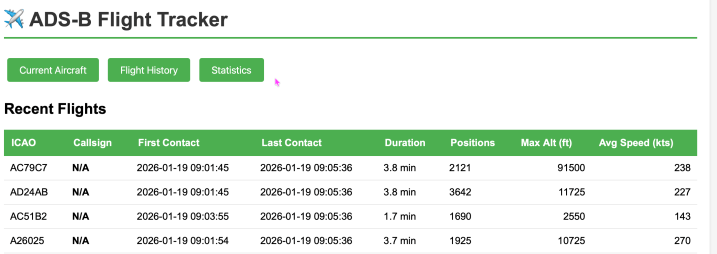
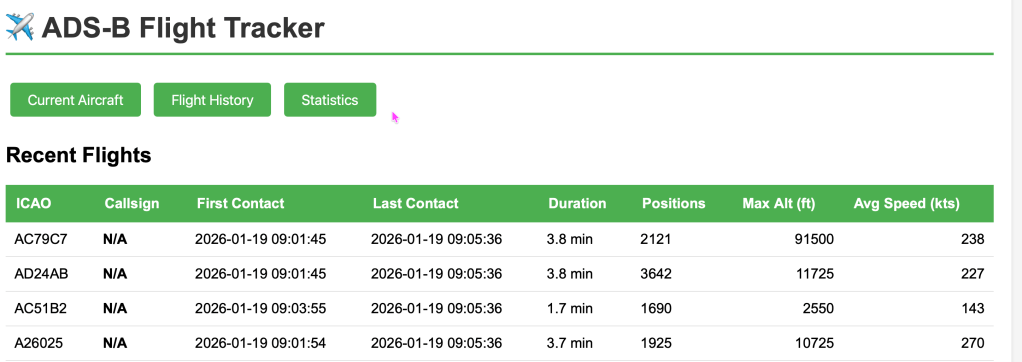
Flight History Page
- All tracked flights with detailed statistics
- First contact time, last contact time, flight duration
- Number of position reports, maximum altitude, average speed
- Sorted by most recent activity
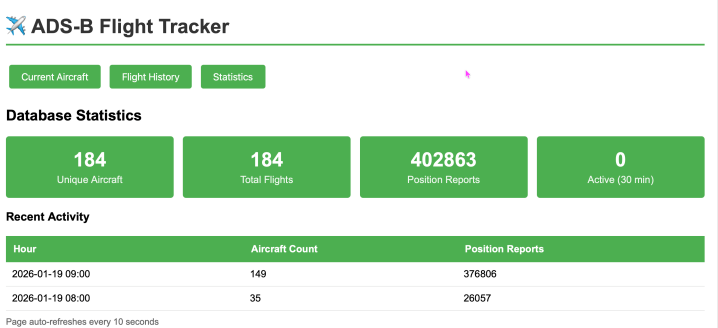
Statistics Page
- Overall database statistics
- Hourly breakdown of aircraft activity
- Position report counts by hour
Claude’s Lessons Learned
- Oracle INTERVAL types are tricky: The syntax differs significantly from other databases. Use
NUMTODSINTERVAL()andEXTRACT()for date/time arithmetic. - Views can’t have ORDER BY: A common mistake. Apply ordering when querying the view, not in the view definition.
- The oracledb package has changed: If you’re used to cx_Oracle, the way you handle bind variables with RETURNING clauses is different.
- Docker makes Oracle easy: Running Oracle in Docker is far simpler than a local installation, especially on macOS.
- Python isn’t so scary: Even for someone who “is crap at coding,” breaking the problem down into small functions makes it manageable.
Future Enhancements
Some ideas for extending this project:
- Map visualization: Add Leaflet or Google Maps to plot aircraft positions in real-time
- Aircraft database integration: Look up aircraft registration and type from external databases
- Alerts: Notify when specific callsigns or aircraft are detected
- Flight path replay: Animate historical flight paths
- API endpoint: Expose data via REST API for other applications
- Mobile app: React Native or Flutter app for viewing data on the go
Conclusion
This project combined my Oracle database expertise with Python programming to create something genuinely useful. The ADS-B data streaming in from my Raspberry Pi is now safely stored in Oracle 23ai, complete with a clean web interface for viewing and querying the data.
The journey from initial concept to working application involved several Oracle-specific challenges, but each error was a learning opportunity. If you’re an Oracle DBA thinking about building applications, don’t let Python intimidate you – start small, Google the errors, and build incrementally.
The complete code is available on my GitHub (link coming soon), and I’d love to hear if anyone builds upon this or adds those future enhancements!
Technical Specifications
- Language: Python 3.7+
- Database: Oracle 23ai Free (Docker)
- Web Framework: Flask 3.0+
- Database Driver: python-oracledb 2.0+
- Data Source: Flightradar24 ADS-B receiver (BaseStation format, port 30003)
- Platform: macOS (but should work on Linux/Windows with minor adjustments)
Happy tracking!


 Sage and Pepper's Musings
Leave a comment